
Late Friday, OpenAI updated the ChatGPT app on iOS and iPadOS with a new widget for your Dot and Shortcuts actions that let you control it three ways. The implementation is really well done and adds automation options worth considering.
First of all, the Dot widget is about as simple as it gets, but also very useful. I have the ChatGPT app set up to drop me into its Codex view because that’s typically how I use the app. I open Codex, check on a long-running project, and provide whatever input is necessary to keep things moving.
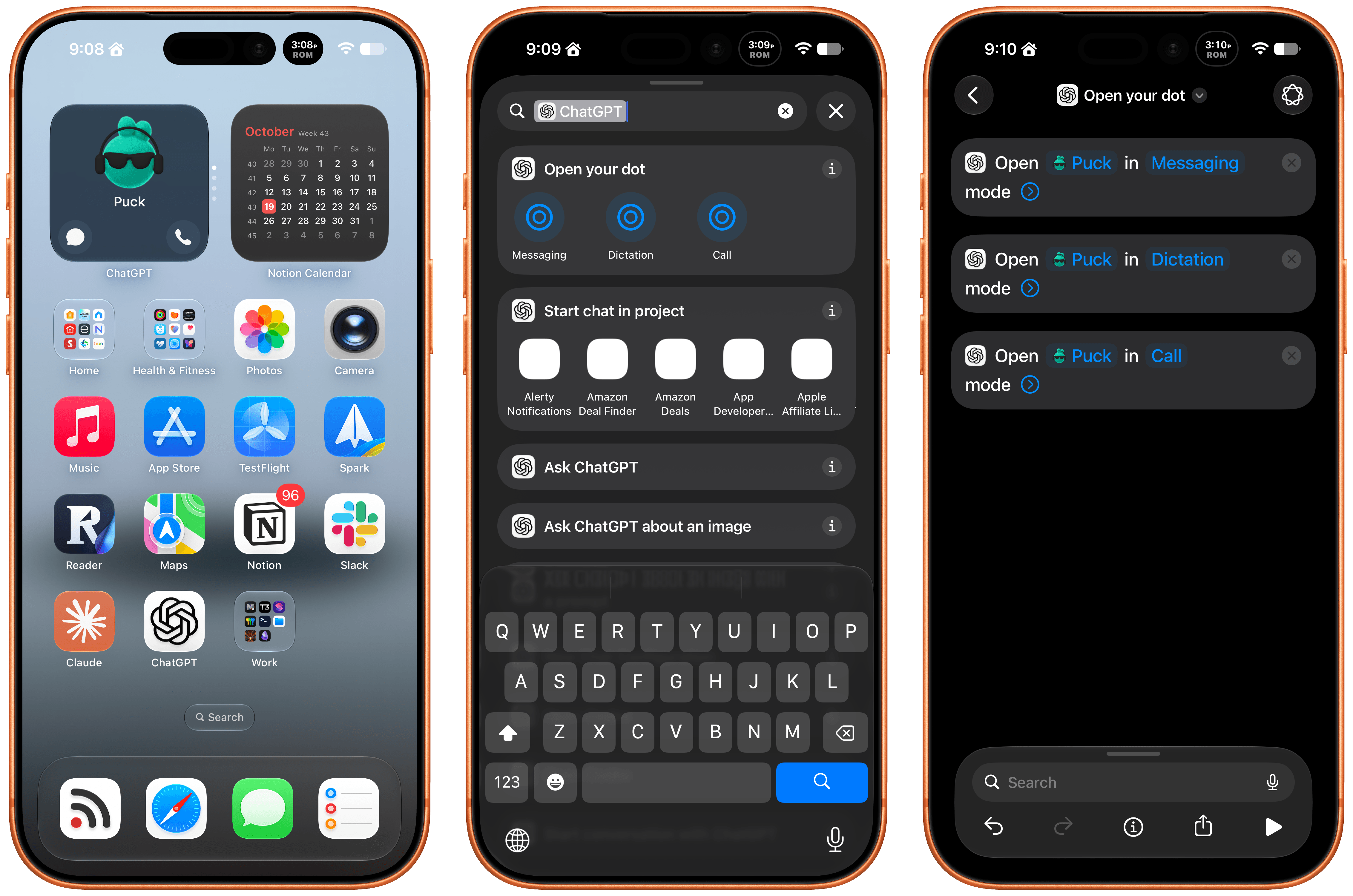
The problem I’ve run into is that I’ve been using my Dot, Puck, more and more to kick off research, ask one-off questions and check in on things like my email. Landing in Codex means tapping around more, which I can avoid now with ChatGPT’s new small-sized widget. The widget has two modes. The first simply shows your Dot’s avatar, and tapping on it opens your Dot’s message thread. However, if you edit the Dot, you can toggle on the “Show shortcut button” to display messaging and voice buttons beneath your Dot, adding the option to start a voice call with your Dot. As simple as this is, it’s been great to have the option to start in Codex via the ChatGPT app or check in with my Dot thread using the widget.
The other interesting feature is a trio of Shortcuts actions to message, dictate, or call your Dot. Each action has two parameters: the name of your Dot and how you want to communicate with it. That first parameter is an interesting one because tapping on it opens a list with your sole Dot in it because currently, you can only have one Dot. However, it also strongly suggests that the ability to set up multiple Dots is on the horizon, which OpenAI clearly telegraphed during its DevDay. After all, why have a parameter that opens a list unless there’s more than one choice?
I’ve set my Action button up to call my Dot.
The actions can be used in your shortcuts, are accessible from Spotlight Search, and most interestingly can be tied to an iPhone’s Action button, allowing you to visit your Dot’s thread in any of three ways. I’ve set my Action button up to start a Dot call. I often think of tasks and have ideas for research topics when I’m out for a walk, and I want to see if having brief calls with my Dot is an effective way to get a jump on those ideas, so they’re waiting for me in ChatGPT when I get home.
These actions and widgets are an excellent addition to OpenAI’s app and a cut above Anthropic’s more barebones approach to widgets and Shortcuts. I would, however, like to see Dots integrated even deeper into Shortcuts. The Shortcuts actions only open your Dot thread in one of the three modes. I’d love to be able to connect Dots to other apps with actions that accept input from other sources and produce outputs that can be used in other actions.
While I’m making requests, I still think multiple Dots need to be supported sooner rather than later, and OpenAI needs to provide a better mechanism for switching between Macs if you use a Dot with multiple computers. Plus, Dots are still a little buggy, with scheduled tasks failing too often and for reasons that aren’t always clear.
That said, the latest update is worth checking out if you’ve found Dots helpful. The strength of Dots is that they’re everywhere you can access ChatGPT, and now with widgets and Shortcuts actions, getting to your Dot in each of those places is easier than ever.