
Configuring cloud-based environments is complex, as it requires considering networking, subscriptions, services, and all the components that make up the underlying infrastructure. Manual setup is error-prone, inconsistent, and difficult to reproduce.
This tutorial shows how to set up a fully automated cloud environment using GitLab as the main operations brain. All the cloud infrastructure is defined as code (hosted on GitLab) and deployed on AWS with OpenTofu through GitLab CI/CD pipelines. On top of this, these pipelines also handle the build and deployment of a real web application, using GitOps practices with Argo CD.
Why infrastructure as code and GitOps?First, it is important to understand why infrastructure as code (IaC) and GitOps matter, and how GitLab brings these practices together in a single platform.
IaC ensures environments are:
- Reproducible: The same configuration can be deployed anywhere.
- Versioned: Every change is tracked in a Version Control System (VCS), with Git as the primary choice.
- Automated: No human interaction needed.
GitOps extends these principles into the application lifecycle. Instead of manually applying changes to Kubernetes clusters (or other infrastructure), the desired state of applications lives in Git. A GitOps operator like Argo CD continuously ensures the cluster reflects what is in the repository. This brings:
- Consistency between environments
- Faster recovery with rollbacks that are as simple as reverting a commit
- Better collaboration because teams can review and approve changes via merge requests
- Increased security through deployments that are performed without requiring direct access to the cluster by the developers
GitLab combines all the capabilities required for this approach:
- Source code management: Track infrastructure and application code in one place.
- CI/CD pipelines: Automate provisioning with OpenTofu and deployments with Kubernetes manifests.
- Terraform states: Store and manage infrastructure state files securely.
- Container Registry: Build, store, and manage container images next to the code and pipelines.
With GitLab, everything from provisioning cloud infrastructure to application delivery happens through one platform.
To follow this tutorial, you will need:
- Basic knowledge of GitLab CI/CD pipelines and Git
- Familiarity with iac (Terraform or OpenTofu) and GitOps
- An AWS account
- A Kubernetes cluster (EKS is provisioned in the tutorial)
- Dockerfile for the sample web application
This tutorial includes instructions to:
- Provision a complete AWS environment (networking, EKS) using OpenTofu
- Configure Kubernetes tools (Argo CD, CertManager) automatically
- Deploy a sample web application using GitOps principles with Argo CD
- Build and package a sample web application with GitLab CI/CD
Read on to learn how to reproduce this example in your own GitLab environment. You can find the source code of this example in the SATEC Public Demo Group.
Provision a complete AWS environment (networking, EKS) using OpenTofuThe first step is to provision the cloud infrastructure with OpenTofu (the open-source Terraform fork). We can declaratively define networking components and create an Amazon EKS cluster.
To make this process reproducible and secure, we rely on GitLab CI/CD variables instead of hardcoding values. These variables allow us to configure the AWS environment dynamically across pipelines.
The following environment variables are required and need to be declared under Settings > CI/CD > Variables in the parent group (to be inherited by all projects):
- TF_VAR_region: AWS region where the infrastructure will be created (e.g., eu-west-1)
- TF_VAR_instance_type: EC2 instance type for worker nodes (e.g., t3.medium)
- TF_VAR_instance_count: Number of worker nodes in the cluster
- TF_VAR_cluster_name: Name of the EKS cluster to provision
- AWS_ACCESS_KEY_ID: AWS access key for authentication
- AWS_SECRET_ACCESS_KEY: AWS secret key for authentication
All variables are defined as protected in GitLab, and sensitive ones such as the AWS secret access key are also masked, ensuring they are only exposed in secure CI/CD contexts. Security can be further enhanced by following this CI/CD variables tutorial. Separating code from configuration makes the pipeline both flexible and independent of environments.
Once configured, the OpenTofu pipeline can be executed automatically to:
- Provision networking resources (VPC, subnets, gateways, routing tables)
- Provision EKS control plane and worker node groups
- Trigger the pipeline to deploy Argo CD and CertManager into the new cluster
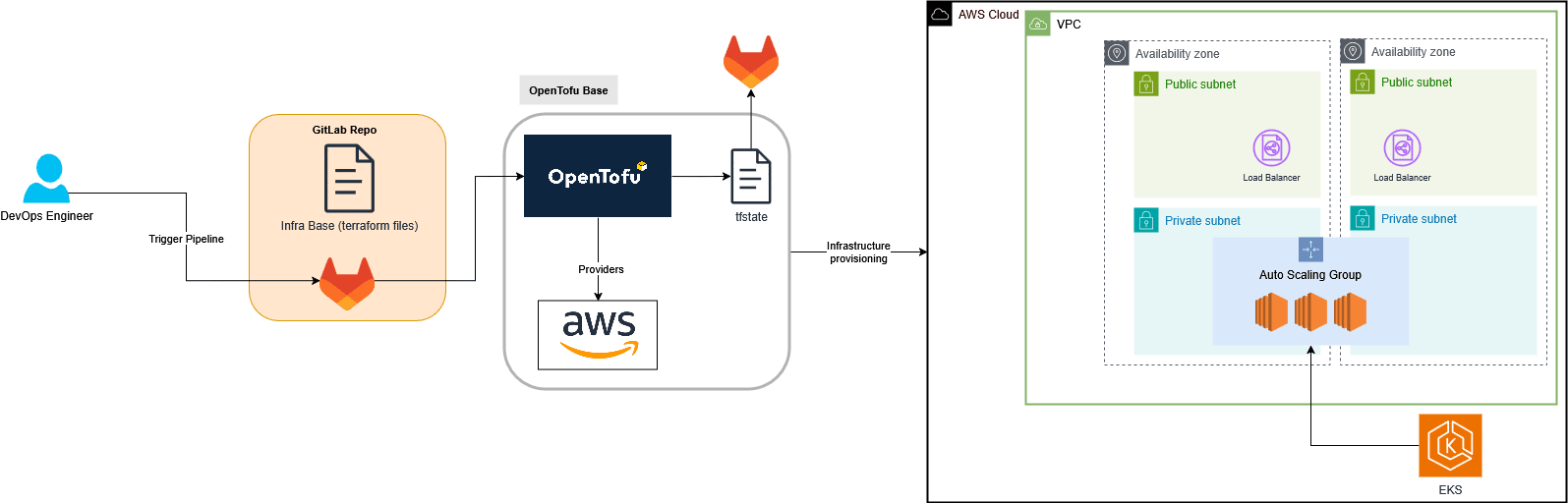
The diagram above illustrates how the infrastructure provisioning process works.
- A GitLab pipeline is triggered from the infrastructure repository, which contains the Terraform/OpenTofu configuration files.
- GitLab CI/CD executes the OpenTofu commands, using the integrated Terraform state backend to securely manage the state file in GitLab.
- OpenTofu connects to AWS through configured providers to create all required resources: the VPC, subnets, gateways, load balancers, and the Amazon EKS cluster distributed across multiple availability zones.
At the end of this stage, the AWS environment and Kubernetes cluster are fully provisioned and ready to operate.
The final step of this process (post-deploy) is to trigger a secondary GitLab pipeline (located in a dedicated repository), which is responsible for deploying Argo CD and CertManager automatically into the new EKS cluster using the Helm Provider.
Configure Kubernetes tools (Argo CD, CertManager) automaticallyOnce the AWS infrastructure and the EKS cluster have been successfully provisioned, the next step is to configure the Kubernetes tools required to operate the environment, which are Argo CD, CertManager, and Ingress NGINX Controller.
This process is fully automated through a secondary GitLab pipeline hosted in a separate repository.
The execution of this second pipeline is triggered automatically from the infrastructure pipeline, using a trigger job once the OpenTofu provisioning stage has completed successfully.
In practice, this means that the deployment of these core components happens seamlessly as part of the same end-to-end workflow, there are no manual steps required. The deployment itself is handled by OpenTofu using the Helm provider, which allows managing Helm charts declaratively as code through GitLab.
A simplified workflow looks like this:
- The first pipeline provides the EKS cluster and triggers the second one via a GitLab trigger job.
- The second pipeline uses OpenTofu with the Helm provider to:
- Download Kubeconfig from the EKS cluster.
- Install Argo CD (for GitOps management).
- Install CertManager (for automated TLS certificate management).
- Install Ingress NGINX Controller (for ingress traffic routing). (Note: Ingress NGINX Controller is being deprecated in the Kubernetes ecosystem; for new deployments, it is recommended to consider alternatives such as Traefik or an API gateway-based approach.)
- Each Helm release is defined in the OpenTofu configuration, allowing upgrades or rollbacks through standard infrastructure code changes.
- Finally, a third pipeline is triggered to deploy the sample web application. This pipeline applies to the Argo CD application manifests that define the web app and its associated resources.
Once all the core Kubernetes components (Argo CD, CertManager, and Ingress NGINX Controller) are installed, the final stage of the automation pipeline begins. This step is executed automatically right after the Helm chart installation process is completed.
A third GitLab pipeline is triggered, responsible for deploying a sample web application into the newly created EKS cluster through Argo CD.
The diagram below shows the overall process:
In this stage, GitLab uses the kubeconfig generated by OpenTofu to connect to the cluster and apply the Argo CD application manifests that define the desired state of the web application.
The pipeline:
- Downloads and updates the kubeconfig file to connect to the EKS Cluster.
- Updates credentials and repository information dynamically using CI/CD variables.
- Creates the Kubernetes namespace for the application (aws-summit-app).
- Applies the Argo CD manifests (repository.yaml, application.yaml, cluster-issuer.yaml).
- Creates a Container Registry secret to allow the application to pull images securely from GitLab using an access token.
All these actions are performed automatically through GitLab CI/CD, with no manual intervention.
Once the manifests are applied, the Argo CD controller detects them and synchronizes the application state with the repository, deploying the sample web page into the EKS cluster.
The result is a fully operational Kubernetes environment, where:
- Infrastructure is provisioned with OpenTofu.
- Cluster tools are installed declaratively with Helm.
- Applications are deployed and managed via GitOps using Argo CD.
This approach ensures end-to-end automation, traceability, and reproducibility, all managed by GitLab.
Build and package a sample web application with GitLab CI/CDBefore the application is deployed through Argo CD, it must first be built, containerized, and published to the GitLab Container Registry.
This process is managed through a dedicated CI/CD pipeline and follows a GitOps repository structure, where the source code and Kubernetes manifests are stored in separate repositories.
In this setup, the GitLab group is organized into two main sections:
- Apps/ contains the source code repositories for the applications.
- Example: aws-summit-app/web holds the source code of the sample web page.
- Deployments/ contains the repositories with Kubernetes manifests for each application.
- Example: aws-summit-app/web within Deployments defines the Kubernetes manifests to deploy the web page (deployment.yaml, ingress.yaml, service.yaml, etc.).
This separation enables a clean GitOps workflow because application code and deployment configurations are independent but remain synchronized through automation.
The CI/CD pipeline defined in the application repository automates the following tasks:
- Build and package: The pipeline compiles the source code and builds the Docker image using the provided Dockerfile.
- Publish to the GitLab Container Registry: The image is automatically tagged and pushed to the integrated GitLab Container Registry.
- Update deployment manifests: Once the image has been published, the pipeline executes a job that updates the image reference inside the corresponding deployment repository (under Deployments/aws-summit-app/web).
These are performed automatically by committing the new image tag or creating a merge request.
Once the commit or merge request is created, Argo CD automatically detects the change in the deployment repository and synchronizes the updated manifests with the Kubernetes cluster, ensuring that the new application version is deployed without any manual intervention.
SummaryThis tutorial demonstrated how to build a fully automated cloud environment with GitLab as the central hub, achieving the goals we set out at the beginning: infrastructure that is reproducible, versioned, and automated. By combining OpenTofu for infrastructure provisioning, GitLab CI/CD for pipeline orchestration, and Argo CD for GitOps-based application delivery, teams can manage the entire lifecycle — from cloud resources to running applications — through a single platform.
As a GitLab partner with deep expertise in cloud infrastructure and DevSecOps practices, Clober (SATEC group) can help organizations implement similar automated environments tailored to their specific needs.
Note: This blog post is based on a live demo originally presented at AWS Summit Madrid 2025 by the Clober DevSecOps team (SATEC group).
Resources- GitLab CI/CD components
- GitLab Container Registry
- GitLab-managed Terraform state management