
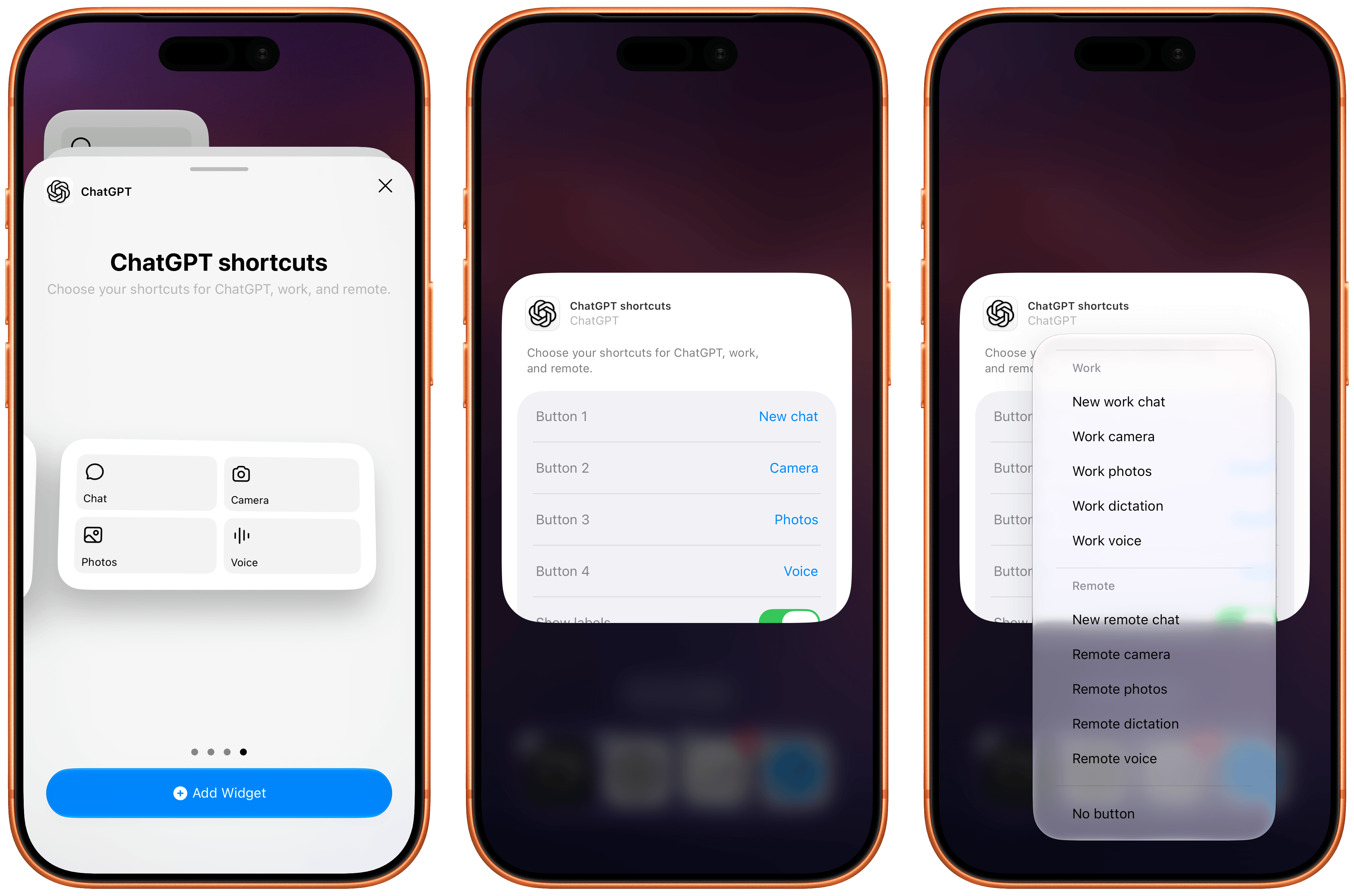
The new ChatGPT widget for iOS.
The most recent update to the ChatGPT app for iOS has introduced a new feature that will make those who rely on the company’s AI assistant for work-related tasks quite happy: a customizable widget that lets you control which shortcuts can be placed for convenient access on the Home Screen.
The new widget is called ‘ChatGPT shortcuts’, and it comes in two sizes – small and medium. Alas, the company didn’t add support for large widgets on iPhone yet, nor did they roll out an XL widget for iPad users. I hope more sizes will be coming soon. Unlike the existing ‘ChatGPT’ widget, the new one allows you to personalize which shortcuts are visible on the Home Screen. Once added, long-press the widget, select ‘Edit Widget’, and you’ll be presented with options to choose which buttons you want to show and whether labels should be displayed underneath them or not.
What’s especially nice about these widgets is that they cover the full spectrum of “ChatGPT surfaces” now offered by OpenAI: Chat, Work, and Codex Remote. For each, you can swap default buttons for the following ones:
- Chat
- New chat
- Camera
- Photos
- Dictation
- Voice
- Work
- New work chat
- Work camera
- Work photos
- Work dictation
- Work voice
- Remote
- New remote chat
- Remote camera
- Remote photos
- Remote dictation
- Remote voice
I’m a huge fan of Codex Remote for iOS and iPadOS: as things stand right now in the AI industry, OpenAI’s Remote “app inside an app” for iPhone and iPad is the only intuitive, full-featured solution to start new chats in a remote agent running on macOS directly from iOS and iPadOS. (I am as surprised as everyone else that Anthropic, who were first to the “remote control” space, haven’t shipped a comparable experience in Claude for iOS. Supposedly, that is coming “soon”.)
What do you want to open – Voice or Voice?
Even more impressively, Remote voice (a version of ChatGPT Voice that runs in Codex on the Mac and lets you have bidirectional conversations from the iPhone while the agent is running on the Mac and orchestrating threads there) can now also be accessed from Control Center and the Lock Screen via a dedicated control. Unfortunately, this control has the same icon as regular ChatGPT Voice (which runs in the cloud, not on your Mac). I know: it can all be very confusing, and I hope OpenAI brings some clarity to these icons soon. On a similar note, I wish OpenAI’s iOS team also offered the widgets’ new shortcuts as proper actions in the Shortcuts app. Right now, these launchers are only available from the Home Screen.
The new customizable widgets are the latest entries in a larger push by OpenAI to improve the performance of Codex Remote on iOS and other design changes for iPhone and iPad users. The ChatGPT app recently received a redesigned ‘latest photos’ picker in Chat and Work modes (long-press the + button in the text box, and you’ll see), a tweaked reasoning selector, and the cloud browser we covered earlier this week on MacStories.