
If you run application security across more than one top-level group, getting a single organization-wide view of your risk has meant manually pulling together data. That is operational work rebuilt in spreadsheets and one-off scripts every time someone asks. This manual work is easy to get wrong, and is often out of date the moment it is published. Every hour spent assembling that view is an hour your security team is not spending on strategic work to drive down risk.
With GitLab 19.4, the security dashboard now gives you a consolidated view of risk at the organization level. Across every top-level group and every scanner your teams run, you can see how your whole application security program is doing, find where the real risk is concentrated, and act on it, without stitching anything together by hand. Your team spends its time remediating vulnerabilities instead of assembling reports, and when leadership or an auditor asks where the organization stands, you have a current, defensible answer on one screen. The organizational level security dashboard is available in beta for GitLab.com users.
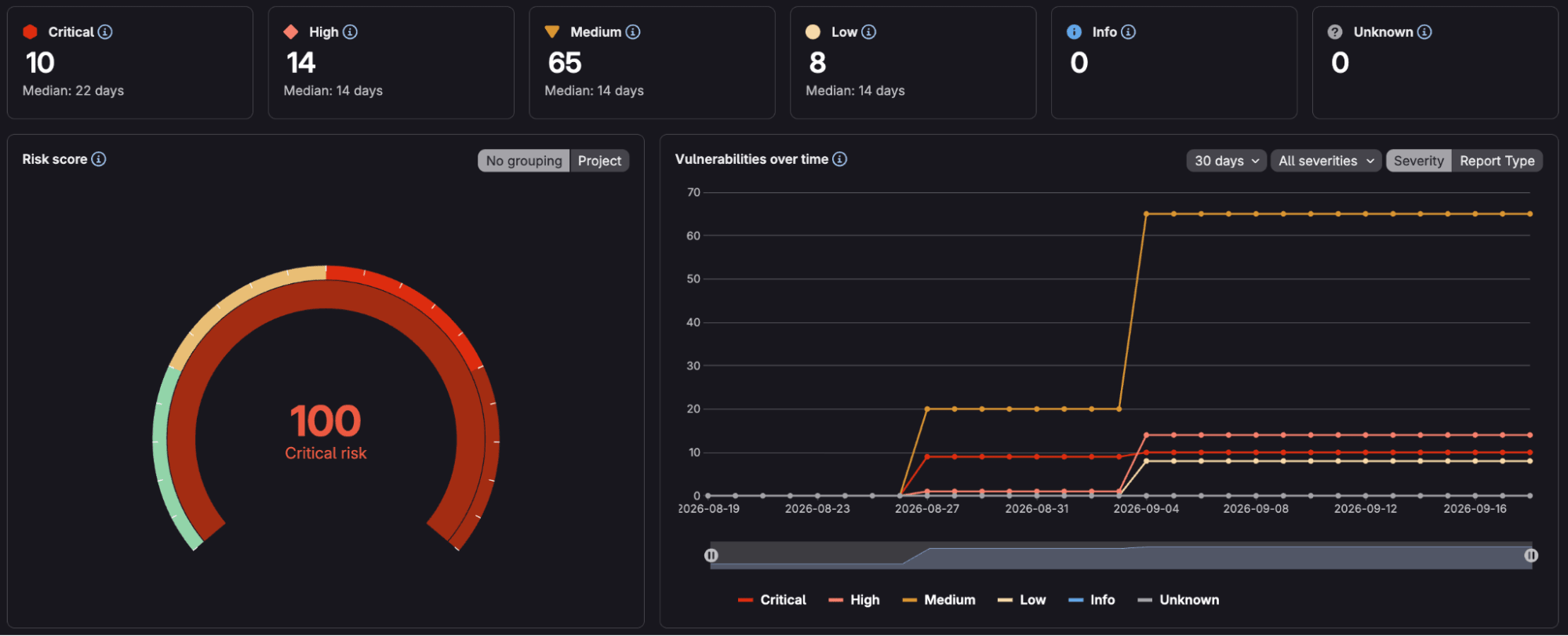
See total risk, then triage down to the projectThe risk score quantifies the risk level across the entire organization. This score is calculated based on the severity and age of your open vulnerabilities, whether each one appears on the Known Exploited Vulnerabilities (KEV) list, and its Exploit Prediction Scoring System (EPSS) score. The risk score helps security leaders prioritize what area of the organization is most susceptible to threats, rather than a raw count that treats every finding as equal.
The charts around the risk score also proactively answer follow-up questions. The Vulnerabilities over time view shows whether risk is trending up or down across the organization over 30, 60, or 90 days. Vulnerabilities by age shows what is going stale and slipping past your remediation targets. Open vulnerabilities by severity and the top 10 Common Weakness Enumeration (CWE) show the shape of the risk, so a weakness that recurs across the whole organization gets interpreted as a training or policy gap rather than a series of bugs. Filter the entire dashboard by project or by report type to focus on static application security testing (SAST) or dependency scanning vulnerability types.
Consolidate every scanner into one viewThe organization dashboard isn’t limited to GitLab's own scanners. Any third-party scanner that outputs Static Analysis Results Interchange Format (SARIF) reports can feed its findings into GitLab. These become vulnerability records like any native finding and roll up into the same risk score, charts, and per-project view. For a security team running multiple tools across the organization, you get one consolidated read on risk, including GitLab's scanners and those you already run, rather than a separate dashboard per tool and manual efforts to combine them.
Turn on the organization security dashboardThe organization security dashboard is available in beta on GitLab.com for Ultimate. It reads the data your projects already produce, so switching it on depends on having the right pieces in place.
Before the dashboard can display your org-level risk, confirm four things:
- You have created an Organization with multiple top-level groups using the Organizations (Beta) feature. To do this, Owners can Create Organizations under Settings > General > Advanced.
- You have Owner role access to the Organization-level in GitLab.
- Advanced search and advanced vulnerability management are active. These power the rollup across top-level groups, and on GitLab.com they are on by default.
- Your projects run at least one security scanner and have a completed scan on their default branch, so there are vulnerabilities to aggregate.
With that in place, go to the top bar, select Search or Go to, and choose your Organization. In the left sidebar, select Secure, then Security dashboard. The organization view opens with the risk score and the charts across every top-level group in the organization.
Not on GitLab Ultimate yet? Start a free trial today to get organization-level visibility into your risk posture.